 Wirefolio
Edit requests in flight.
Pause a Chrome request before it’s sent, change its method, URL, headers, or body, then forward your edited request.
v0.6.0 · View on GitHub
Wirefolio inspector
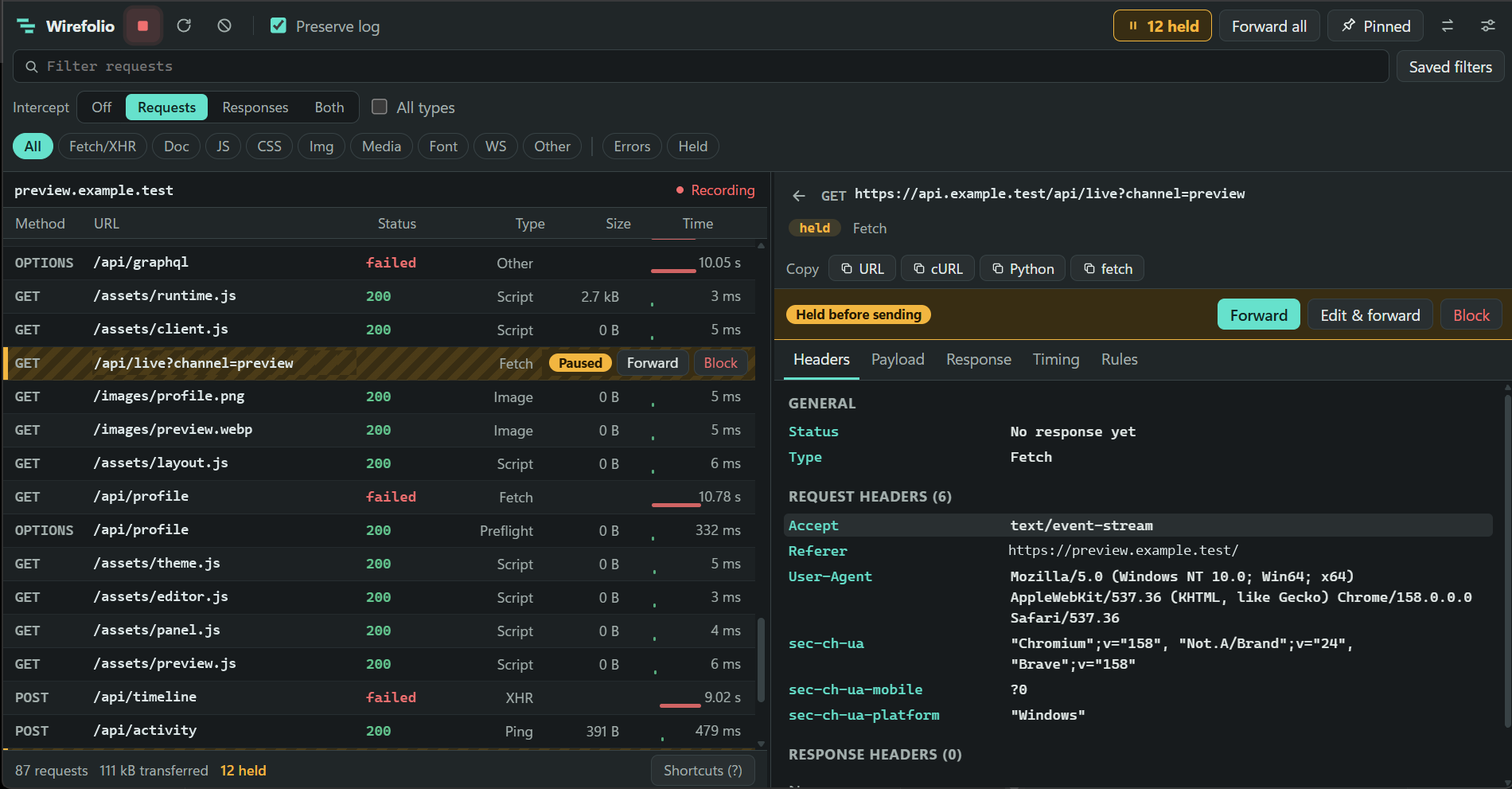
Follow a request from the browser  to the response
 .
Open the headers, inspect the body, and pin the requests you’ll need again.
Change the request before it leaves Chrome.
Edit & forward
Interception guide-

GET /api/previewHeld before sendingPause
Hold a request from the app you’re developing.
-
 Change the theme parameter from light to dark.
Edit
Change the method, URL, headers, or body.
-

200 OKResponse receivedForward
Send the edited request and inspect the response.

Find it again
Filter by status, method, or domain. Save the filters you reach for most.

Read the response
See formatted JSON, or preview captured images, HTML, audio, and video.

Edit the response, too
Try a different status, header, or body before your app receives the response.

Keep the useful ones
Pin a request in your Chrome profile or copy it as cURL, Python, or fetch.
Set up Wirefolio in Chrome.
Install the unpacked extension from GitHub Releases.
- 1
Download and extract
Download the ZIP and extract it into a folder you’ll keep.
Open the release - 2
Load the extension
In
chrome://extensions, turn on Developer mode. Choose Load unpacked and select the folder withmanifest.json. - 3
Record a tab
Open a page, select Wirefolio from Chrome’s toolbar or Extensions menu, and click Record.
Good to know.
Read the docs for filters, previews, and troubleshooting.
What can I record?
Recording starts when you choose Record and captures requests from the displayed tab. Try reloading the page after you start.
Where does my data go?
Wirefolio has no analytics or hosted backend. Pins stay in your Chrome profile and can contain sensitive headers or bodies. Review captures before sharing them. Privacy and permissions
Can I share a capture?
In Settings, choose Export HAR and select Metadata only to export origins, methods, statuses, sizes, and timings.
How do I update?
Extract the new release into the same extension folder, then click Reload on the Wirefolio card in chrome://extensions.
Ready to follow a request?
Start with a single tab and see what comes back.